If you’ve felt the AI space drifting into “benchmark theater” and hot takes, GPT-5.2 is a refreshing moment to zoom back in on what actually matters: does it help you do real work faster, with fewer mistakes, and cleaner outputs?
OpenAI says GPT-5.2 is rolling out in three variants—Instant, Thinking, and Pro—and it’s specifically tuned for professional knowledge work, including better long-context reasoning, stronger tool use, and noticeable gains in spreadsheet and presentation workflows.
This guide is built for operators, builders, and everyday users who want a use-case-first upgrade plan—not hype, not fan wars, not “just prompt better.” We’ll walk through what changed, who should care most, and a step-by-step way to adopt GPT-5.2 so you can see real ROI this week.
Table of Contents
- What GPT-5.2 is (and what “Instant vs Thinking vs Pro” actually means)
- What changed in GPT-5.2 (practical upgrades that show up in real work)
- 2.1) Better long-context reasoning (the “can you follow the thread?” upgrade)
- 2.2) Stronger “agentic” tool calling (more doers, fewer talkers)
- 2.3) Major spreadsheet gains (this is where non-hype ROI often lives)
- 2.4) Early gains in slideshow creation (useful, but validate)
- 2.5) Practical reliability and safety improvements in sensitive areas
- 2.6) Availability and rollout (what you should expect today)
- 2.7) Pricing and token efficiency (important for builders)
- Who benefits most (with concrete use cases)
- Which GPT-5.2 tier should you use? (decision guide)
- A step-by-step upgrade playbook you can follow today
- Mini case studies: spreadsheets, long docs, and coding workflows
- Benchmarks without the hype (how to read the numbers)
- FAQs: availability, pricing, legacy models, and best practices
- Conclusion + next steps
- Sources to cite and link (reliable, up-to-date)
1. What GPT-5.2 Is (and Why the Model Names Confuse People)
GPT-5.2 is a model family with three “modes” that map to different tradeoffs:
- GPT-5.2 Instant: speed-first, everyday workhorse
- GPT-5.2 Thinking: deeper reasoning, long-context, more structured outcomes
- GPT-5.2 Pro: highest quality and trust for difficult questions, typically slower and more expensive (especially in the API)
OpenAI also uses different naming between ChatGPT and the API, which matters if you build products or automations.
GPT-5.2 naming: ChatGPT vs API
| Where you use it | What you see | What it maps to (API) |
|---|---|---|
| ChatGPT | GPT-5.2 Instant | gpt-5.2-chat-latest |
| ChatGPT | GPT-5.2 Thinking | gpt-5.2 |
| ChatGPT | GPT-5.2 Pro | gpt-5.2-pro |
OpenAI lists this mapping directly in the release notes.
Why this matters: If you want consistent results in production (or across your team), you need to be explicit about which tier you’re using. Otherwise, you’ll get “it worked yesterday” chaos.
2. What Changed in GPT-5.2 (In Plain English)
Let’s translate the release into practical changes you’ll feel in day-to-day work.
2.1) Better long-context reasoning (the “can you follow the thread?” upgrade)
If you regularly paste in long docs, policies, contracts, research, transcripts, or meeting notes, GPT-5.2 Thinking is built to hold the thread more reliably—especially when you ask for:
- structured summaries
- decision options and tradeoffs
- consistent formatting across many sections
- step-by-step math or logic
OpenAI describes GPT-5.2 Thinking as designed for deeper work like long-document summarizing and multi-step reasoning.
Real-life example: If you paste a 10–20 page SOP, policy document, or client agreement, a “good” summary isn’t enough. The practical win is getting (1) a clean summary, (2) a list of obligations/requirements, and (3) a section that flags contradictions or missing inputs. That third part is where long-context improvements become measurable, because it reduces rework and surprises.
2.2) Stronger “agentic” tool calling (more doers, fewer talkers)
A big shift in modern AI value is moving from “chat” to “work outputs”: spreadsheets, decks, plans, drafts, and structured artifacts.
OpenAI says GPT-5.2 improves agentic tool-calling and end-to-end task execution (which typically shows up as fewer dropped steps, fewer formatting failures, and less prompt babysitting).
Practical example: Instead of “Give me ideas,” you can ask for an actual deliverable: a project plan with owners and deadlines, a draft SOP with step order, a checklist for a launch, or a customer support macro library. The more the model can “stay in the lane” of your output format, the more value you get.
2.3) Major spreadsheet gains (this is where non-hype ROI often lives)
If your work includes budgets, forecasts, trackers, reconciliations, or planning sheets, GPT-5.2 is explicitly positioned as better at:
- spreadsheet creation
- spreadsheet analysis and formatting
OpenAI also posted this emphasis publicly.
Even more useful: OpenAI reports an internal benchmark for “investment banking spreadsheet tasks,” where GPT-5.2 Thinking outperforms GPT-5.1 Thinking.
Real-life example: A budget isn’t just math—it’s structure. If you ask for a monthly budget table, a useful model will also label assumptions, separate fixed vs variable costs, and add a “sanity check” section that highlights what’s likely missing (software renewals, one-time setup costs, taxes, churn buffers, or seasonal swings). When spreadsheets get cleaner on the first pass, that is one of the fastest paths to ROI.
2.4) Early gains in slideshow creation (useful, but validate)
OpenAI describes “early gains in slideshow creation.” That wording matters. It signals improvement, but not perfection.
So, yes—expect better structure, cleaner bullet logic, and stronger “executive summary → supporting slides.” But still review numbers, claims, and formatting before you ship.
Practical example: A reliable workflow is “one-slide executive summary + 3–6 supporting slides + speaker notes.” If you do that consistently, the deck becomes easier to scan, and your edits become smaller. Slideshow improvements matter most when they reduce your time spent reorganizing, rewriting, and cleaning up structure.
2.5) Practical reliability and safety improvements in sensitive areas
OpenAI says GPT-5.2 builds on its “safe completion” work and reports improved behavior in sensitive conversations, including mental health distress and self-harm prompts, with metrics shown in its release materials.
If you run a business workflow where safety, compliance, or user wellbeing matters, that’s not “PR fluff.” It’s operational risk control.
2.6) Availability and rollout (what you should expect today)
OpenAI says GPT-5.2 begins rolling out in ChatGPT starting with paid plans, and that rollout is gradual. OpenAI also posted that rollout begins with Plus/Pro/Business/Enterprise, with Free and Go receiving access later.
If you don’t see it yet, that doesn’t mean you’re doing something wrong. It usually means the rollout hasn’t hit your account.
2.7) Pricing and token efficiency (important for builders)
OpenAI lists GPT-5.2 API pricing and highlights that while GPT-5.2 costs more per token than GPT-5.1, it can cost less for the same quality due to token efficiency and fewer retries.
Here’s the pricing structure OpenAI publishes (API):
| Model | Input (per 1M tokens) | Cached input | Output (per 1M tokens) |
|---|---|---|---|
| GPT-5.2 / gpt-5.2-chat-latest | $1.75 | $0.175 | $14 |
| GPT-5.2 Pro / gpt-5.2-pro | $21 | — | $168 |
| GPT-5.1 / gpt-5.1-chat-latest | $1.25 | $0.125 | $10 |
Source: OpenAI’s GPT-5.2 release.
3. Who Benefits Most From GPT-5.2?
GPT-5.2 helps almost everyone, but some groups will feel the upgrade faster.
Operators and founders
If you live in planning, decision-making, and “turn messy inputs into clean outputs,” GPT-5.2 Thinking tends to shine in:
- weekly planning
- SOP creation
- KPI dashboards
- stakeholder updates
- “here’s the plan + here are the risks + here’s the next 5 actions”
Analysts and finance-minded users
If you build or interpret spreadsheets, the upgrade can show up as:
- fewer formatting failures
- cleaner table logic
- better “assumptions → calculation → output” structuring
Teams producing client deliverables
If you ship artifacts (decks, docs, plans, reports), GPT-5.2 can reduce time spent on:
- first drafts
- structure
- rewrite cycles
- “make it executive-ready”
Developers and builders
If you build agentic systems, OpenAI’s prompting guide emphasizes GPT-5.2’s accuracy, instruction following, and disciplined execution across complex workflows—exactly what breaks multi-step automations.
4. Which GPT-5.2 Tier Should You Use? (A Practical Decision Guide)
Use this like a shortcut.
Choose GPT-5.2 Instant when…
You want speed and decent quality for:
- quick answers, quick drafts
- email replies
- short summaries
- lightweight research
- translations and rewrites
Choose GPT-5.2 Thinking when…
You need structure, depth, and fewer missed steps:
- long documents (summaries, Q&A, extraction)
- multi-step planning
- spreadsheets and analysis
- “think through this with me” decisions
- code review and debugging that requires context
Choose GPT-5.2 Pro when…
You’re dealing with high-stakes or high-complexity work where “better is worth the wait”:
- complex programming domains
- difficult technical questions
- research-heavy decision support
OpenAI positions Pro as its smartest and most trustworthy option for difficult questions.
5. The GPT-5.2 Upgrade Playbook (Step-by-Step)
Here’s how to adopt GPT-5.2 without getting lost in hype or wasting hours.
Step 1: Pick one workflow you repeat weekly
Start with something you do often. For example:
- weekly KPI report
- client onboarding checklist
- content brief creation
- budget vs actual review
- meeting notes → action plan
Why? Because repeatable workflows make improvement measurable.
Step 2: Create a “before” baseline (10 minutes, no perfection)
Copy your current process into a simple checklist:
- Inputs you usually have
- The final output format you need
- The common mistakes you catch at the end
This baseline becomes your “truth.” Without it, everything feels like improvement—until it isn’t.
Step 3: Run the same task through Instant vs Thinking
Use the same prompt and the same inputs.
Then score each output on:
- correctness (are numbers and claims consistent?)
- completeness (did it miss steps?)
- formatting (is it usable without cleanup?)
- time (how long did it take you to get to “done”?)
Step 4: Add a “Definition of Done” to your prompt
This alone will improve outputs dramatically—especially for spreadsheets and decks.
Example definition-of-done snippet you can paste:
“Before finalizing, check for missing steps, inconsistent assumptions, formatting errors, and unclear labels. If anything is uncertain, list the questions first.”
This pushes the model to self-audit.
Step 5: Build in verification (because all models still miss things)
Even with GPT-5.2, you should treat AI as a powerful assistant—not an oracle.
Add one of these verification loops:
- “Cite sources for factual claims.”
- “Show assumptions and calculations.”
- “List the top 5 ways this could be wrong.”
- “Create a cross-check table.”
OpenAI itself acknowledges ongoing work on issues like latency and over-refusals, which is another reason to keep human oversight for important outputs.
Step 6: Convert your best prompt into a reusable template
Once you get a good output, save a short template like:
- Role: “You are my operations analyst…”
- Inputs: “Here are the metrics…”
- Output format: “Return a table + a 5-bullet executive summary…”
- Quality checks: “Run a final audit…”
Short templates beat giant prompt walls because you’ll actually reuse them.
Step 7: Scale to your second workflow only after the first one proves ROI
This is how you avoid “tool sprawl” and random experimentation.
6. Mini Case Studies (Realistic, Repeatable, High-ROI)
Case Study 1: The spreadsheet upgrade (budget impact + headcount plan)
A classic operator workflow is turning messy notes into a planning sheet.
What GPT-5.2 changes: OpenAI reports measurable improvement on spreadsheet-oriented evaluations (including an internal “investment banking spreadsheet tasks” benchmark).
How to use it today:
- Put your assumptions in a short list.
- Ask GPT-5.2 Thinking to produce:
- a clean table,
- labeled assumptions,
- and a “sanity check” section that flags unrealistic inputs.
Action takeaway: If you do spreadsheet planning weekly, test GPT-5.2 Thinking first.
Case Study 2: Long-document reasoning (policies, contracts, or SOPs)
If you work with long docs, the danger is not only hallucinations—it’s missed constraints.
How to use it today:
- Ask GPT-5.2 Thinking to produce:
- a structured summary,
- a “risk list,”
- and a “questions to clarify” section.
OpenAI explicitly highlights long-document summarizing and deep work as a core target for GPT-5.2 Thinking.
Case Study 3: Simplifying agent systems (real-world operator signal)
One of the strongest signals in OpenAI’s announcement is a partner example describing collapsing a fragile multi-agent system into a simpler setup because GPT-5.2 handled tooling and execution better.
Operator takeaway: If your workflow needs five different tools stitched together, GPT-5.2 may let you simplify. That typically means fewer failure points and lower maintenance.
7. Benchmarks Without the Hype (How to Read the Numbers)
Benchmarks matter, but only when you understand what they measure.
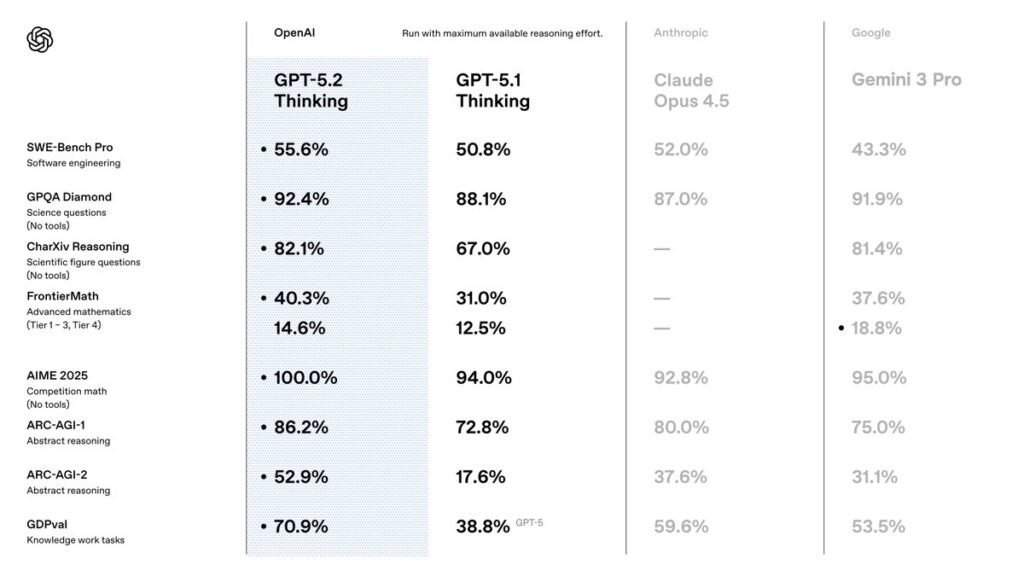
GDPval: “well-specified knowledge work tasks”
OpenAI highlights GDPval as an evaluation across 44 occupations, focused on producing real work artifacts (not just multiple-choice answers).
From OpenAI’s benchmark table:
| Metric | GPT-5.2 Thinking | GPT-5.2 Pro | GPT-5.1 Thinking |
|---|---|---|---|
| GDPval (ties allowed, wins or ties) | 70.9% | 74.1% | 38.8% |
Source: OpenAI’s “Introducing GPT-5.2” appendix.
ARC-AGI-2: fluid reasoning pressure test
OpenAI reports GPT-5.2 Thinking at 52.9% and GPT-5.2 Pro at 54.2% on ARC-AGI-2 (Verified).
How to use this as a reader: Treat it as a directional signal—then validate with your own tasks, because your use case is the only benchmark that pays your bills.
8. FAQs: What People Are Asking Right Now
Is GPT-5.2 available to everyone?
OpenAI says rollout begins today and proceeds gradually, starting with paid plans, and availability differs by tier (including Pro-only access for GPT-5.2 Pro).
Will GPT-5.1 still be available?
OpenAI says GPT-5.1 remains available in ChatGPT for paid users for three months as a legacy model, after which it will sunset in ChatGPT.
Is GPT-5.2 in the API?
Yes. OpenAI states GPT-5.2 models are available via the API, and it also references Codex support.
H3: Should I switch immediately?
Switch one workflow at a time, prove it, then scale. That approach beats impulsive switching every time.
9. Conclusion: The “Not Hype” Way to Win With GPT-5.2
GPT-5.2 is not a magic button. However, OpenAI’s release makes a clear claim: the model family is built to deliver stronger professional outputs, especially in long-context reasoning, spreadsheets, structured artifacts, and tool-driven workflows.
So here’s your practical next move:
- Pick one repeatable workflow.
- Run Instant vs Thinking on the same inputs.
- Add a definition-of-done and a verification loop.
- Save your winning prompt as a reusable template.
Bookmark this guide, then come back after your first GPT-5.2 test run. Next, we’ll publish a companion piece: “GPT-5.2 vs Gemini vs Grok: Fit-for-Purpose, Operator Edition”—with real tasks, not vibes.
10. Sources to Cite and Link (Reliable, Up-to-Date)
For official product details, start with OpenAI’s launch page for GPT-5.2.
To confirm plan availability and rollout timing, the Help Center update is the cleanest reference.
When you need implementation guidance and prompt patterns, the OpenAI Cookbook is the best technical companion.
For real-time rollout announcements, cite OpenAI’s verified X thread.
Finally, if you want independent reporting for extra credibility, Reuters provides third-party coverage.
- Independent launch coverage (Reuters): https://www.reuters.com/technology/openai-launches-gpt-52-ai-model-with-improved-capabilities-2025-12-11/
- Official release notes (OpenAI): https://openai.com/index/introducing-gpt-5-2/
- Access & tiers (OpenAI Help Center): https://help.openai.com/en/articles/11909943-gpt-52-in-chatgpt
- Prompting + workflow guide (OpenAI Cookbook): https://cookbook.openai.com/examples/gpt-5/gpt-5-2_prompting_guide
- Rollout announcement (OpenAI on X): https://x.com/OpenAI/status/1999182100159955419
Do check out our other blog posts and leave a comment. We are sure you will find something of value in them.
Team JAVASCAPE AI
All trademarks, logos, visual design, images, symbols, and content on this website are the exclusive property of JAVASCAPE AI. Any unauthorized use, reproduction, or distribution without explicit permission is strictly prohibited.