From must-have AI assistants to specialist tools worth adding (and what to skip)
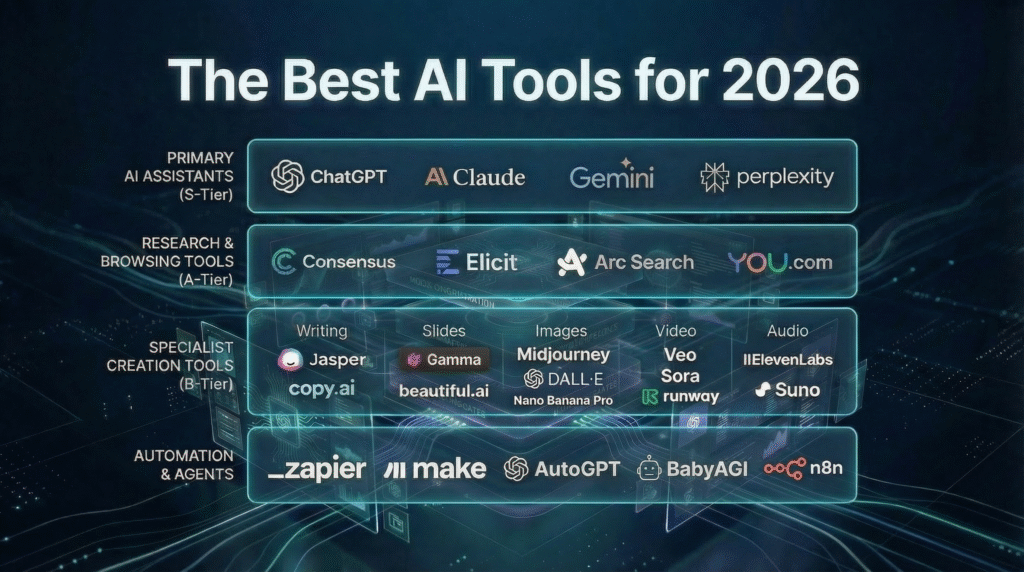
Table of Contents
- A quick note on what’s changed in 2026 (and why “AI stacks” win)
- The S-Tier: Pick your primary AI assistant (the one you’ll use daily)
- ChatGPT (Best for research workflows + voice + search)
- Google Gemini (Best if your world runs on Google—and for cutting-edge image/video)
- Anthropic Claude (Best for clean writing + structured thinking + coding workflows)
- The A-Tier: Research, learning, and browsing without the chaos
- NotebookLM (Best for learning and “grounded” work from your own sources)
- Perplexity (Best for fast, sourced answers) + Comet (AI browsing assistant)
- ChatGPT Deep Research (Best “automated research assistant” for many users)
- Consensus (Best for academic, peer-reviewed research discovery)
- The B-Tier: Specialist tools (writing, slides, images, audio, video, automation)
- For presentations: Gamma
- For turning text into visuals (diagrams, mind maps, explainers): Napkin AI
- For image generation & editing: Nano Banana Pro, Ideogram, Midjourney
- For audio & voice: ElevenLabs
- For video translation (lip sync + many languages): HeyGen
- For automation & AI agents: n8n, Zapier, Make
- For “vibe coding” and AI-assisted development: Cursor
- For music generation: Suno
- For video generation: Sora 2 and Veo 3.1 (and the broader trend)
- A 10-minute decision framework (so you don’t over-buy)
- Recommended starter stacks (student, creator, founder, analyst)
- Privacy + safety checklist (especially for AI browsers and voice cloning)
- FAQ
- Sources + credits
Brief Introduction
If you’ve tested even a handful of AI tools lately, you’ve probably noticed the pattern: a few are genuinely transformative, many are “fine,” and some disappear before you finish your free trial. The smart move in 2026 isn’t collecting dozens of apps—it’s building a tight, reliable AI stack: one core assistant, plus a few specialist tools that cover your biggest gaps.
This guide is a fresh, original take inspired by the tiered “tool stack” concept you shared pasted—but updated for 2026 with current capabilities, practical use cases, and reliable sources.
1) A Quick Note on What’s Changed in 2026 (and Why “AI Stacks” Win)
Two big shifts define this year:
- Core assistants got “agentic.” They don’t just answer—they can research, summarize, and increasingly operate across workflows (with the right tools enabled). OpenAI’s Deep Research is a clear example of this direction. OpenAI+1
- Media generation grew up. Video models now ship with native audio and better controllability—OpenAI’s Sora 2 and Google’s Veo 3.1 are the headline trend. OpenAI+1
So instead of hunting for a “one tool that does everything,” the winning approach is:
One everyday AI assistant + a few best-in-class specialists.
2) The S-Tier: AI Tools Everyone Should Use (Choose at Least One)
These are your “daily drivers.” If you only learn one category deeply, make it this one.
2.1) ChatGPT (Best for research workflows + voice + search)
ChatGPT’s edge in 2026 is how well it combines conversation, web search, and structured research into a single experience. Its Deep Research capability is built for multi-step investigations and produces documented, citeable outputs. OpenAI+1
It also remains a strong pick if you like talking things out: Voice mode supports hands-free ideation and live back-and-forth. ChatGPT+1
And when you need timely info, ChatGPT Search provides web-backed responses with sources. OpenAI+1
Best for:
- Deep dives, research briefs, and decision memos
- Voice brainstorming and “talk-to-think” workflows
- Search-style Q&A with sources
Read our blog on ChatGPT Voice HERE
2.2) Google Gemini (Best if your world runs on Google—and for cutting-edge image/video)
If you live in Docs, Drive, Gmail, or Android, Gemini’s ecosystem advantage is real. In late 2025, Google introduced Gemini 3 as its “most intelligent” model family, pushing reasoning and multimodal capability. blog.google
A new era of intelligence with Gemini 3
Where it gets spicy for creators: Gemini’s media pipeline includes Veo 3.1 video generation (with audio) and newer image models like Nano Banana Pro. Google DeepMind+1
https://gemini.google/overview/video-generation/?utm_source=chatgpt.com
Best for:
- Google-first workflows
- Image generation + editing with strong consistency controls
- Video generation via Veo in the Gemini ecosystem Gemini
2.3) Anthropic Claude (Best for clean writing + structured thinking + coding workflows)
Claude has built a reputation around high-quality prose and clear structure, and Anthropic’s newer model line (Claude 4 family) emphasizes strong performance across writing, research, and coding. Anthropic
If you build software, Anthropic also supports agentic coding tooling like Claude Code, including configurable output styles. Claude Code+1
Best for:
- Long-form writing that sounds human
- Editing, reorganizing, and tightening arguments
- Coding assistance and agentic dev workflows
S-Tier Reality Check (How to choose in 60 seconds)
Pick based on your “home base”:
- Need deep research + voice + great search integration? → ChatGPT OpenAI+1
- Google ecosystem + top-tier image/video creation? → Gemini blog.google+1
- Best writing polish + structured output? → Claude Anthropic
3) The A-Tier: Tools Most People Should Add (Once S-Tier is Chosen)
These are the “amplifiers”—they reduce hallucinations, compress research time, and help you learn faster.
3.1) NotebookLM (Best for learning and “grounded” work from your own sources)
NotebookLM shines when you want AI that’s anchored to your documents. You bring the materials, it becomes your study partner. Google highlights features like Audio Overviews (podcast-style summaries), and NotebookLM’s experience is designed around your sources. Google NotebookLM+2blog.google+2
NotebookLM also added ways to discover sources more easily (reducing the “upload everything manually” friction). The Verge
Use it for:
- Turning PDFs and notes into structured summaries
- Studying: “quiz me,” “explain like I’m new,” “compare viewpoints”
- Building a personal knowledge hub with citations
3.2) Perplexity (Best for fast, sourced answers) + Comet (AI browsing assistant)
Perplexity positions itself as an “answer engine” built around web-backed responses with citations. Perplexity AI+1
And if you want a browser that behaves like a helper, Perplexity’s Comet is designed to assist with research and tasks inside the browsing experience. Perplexity AI+2Perplexity AI+2
Important note (privacy & security): AI browsers are powerful, but they’re also a new surface area. There have been public debates about Comet security claims and patches—so treat AI browsing like a sharp tool: useful, but not something you feed secrets. TechRadar+1
3.3) ChatGPT Deep Research (Best “automated research assistant” for many users)
Deep Research is built for multi-step investigation and synthesis, producing cited reports. It’s specifically framed as an agentic capability that searches and compiles findings. OpenAI+1
If you regularly create:
- market scans
- competitor comparisons
- literature summaries
- policy or strategy memos
…Deep Research is one of the cleanest time-savers in the current mainstream. OpenAI Help Center+1
3.4) Consensus (Best for academic, peer-reviewed research discovery)
When your question needs science—Consensus is built for peer-reviewed literature search and synthesis. Consensus+1
There’s even academic discussion evaluating the tool’s role in research workflows. PubMed
Use it for:
- Evidence-based answers with paper-level citations
- Rapid literature scanning
- Identifying what research actually supports (vs. vibes)
4) The B-Tier: Best AI Tools for Specific Niches (Add only if you need the job done)
This is where you stop “collecting apps” and start buying outcomes.
For presentations: Gamma
Gamma is built to generate and refine presentations quickly from prompts and content. Gamma+1
Great for:
- pitch decks, internal training, quick client slides
- turning rough notes into a clean narrative flow
For turning text into visuals (diagrams, mind maps, explainers): Napkin AI
Napkin is designed to transform text into visuals—useful for business storytelling, diagrams, and mind maps. Napkin AI+1
Great for:
- explaining frameworks visually
- turning meeting notes into shareable diagrams
- content marketing visuals without design gridlock
For image generation & editing: Nano Banana Pro, Ideogram, Midjourney
If you care about consistent characters, clean edits, and better typography, these are common picks:
- Nano Banana Pro (Gemini’s image generator / editor) emphasizes character consistency, local edits, and higher-res output. Gemini+1
- Ideogram is often referenced for stronger text-in-image handling and typography workflows. Ideogram+1
- Midjourney remains a popular creative engine for artistic results. Midjourney
If you want a broader comparison list, Zapier maintains an updated roundup of leading image generators and typical “best at” categories. Zapier
For audio & voice: ElevenLabs
ElevenLabs supports voice generation and voice cloning, with multiple cloning approaches (instant vs. higher-quality training). ElevenLabs+1
Voice cloning is powerful—so use it responsibly and with consent.
For video translation (lip sync + many languages): HeyGen
HeyGen’s video translation is built around multilingual dubbing and synced lip movement, supporting a large language set and localization workflows. HeyGen+1
For automation & AI agents: n8n, Zapier, Make
If you hate repetitive work, automation tools are the highest ROI “B-tier” category.
- n8n: flexible automation with strong control options (including self-hosting routes), designed for technical teams and agentic workflows. n8n+1
- Zapier: huge app ecosystem and AI orchestration positioning across workflows. Zapier+1
- Make: visual-first automation and orchestration, with a heavy emphasis on building AI workflows you can see and control. Make+1
For “vibe coding” and AI-assisted development: Cursor
Cursor is a dedicated AI coding environment with features like AI-assisted editing and code review built into the editor experience. Cursor+1
For music generation: Suno
Suno generates music from text prompts and has become one of the most visible “text-to-song” tools in mainstream creator circles. Suno+1
For video generation: Sora 2 and Veo 3.1 (and the broader trend)
Two major signals for 2026 video AI:
- OpenAI Sora 2: positioned as a flagship video (and audio) generation model with improved realism and controllability. OpenAI+1
- Google Veo 3.1: DeepMind’s state-of-the-art model, highlighted with “video meet audio” positioning and availability through Gemini/Flow pathways. Google DeepMind+1
There’s also pressure across the industry to add video generation directly into creator platforms (Midjourney included). The Verge
5) A 10-Minute Decision Framework (So You Don’t Waste Money)
Use this to build your stack fast:
- Pick one primary assistant (ChatGPT / Gemini / Claude).
- Decide your #1 pain point:
- Research overload → NotebookLM + Deep Research or Perplexity Google NotebookLM+2OpenAI+2
- Content creation → Gamma + image tool (Nano Banana Pro / Ideogram) Gamma+2Gemini+2
- Repetitive tasks → Zapier / Make / n8n Zapier+2Make+2
- Add one specialist tool only if it saves you time weekly.
- Run a 7-day test:
- Track: “minutes saved” and “quality improved”
- Keep what earns its spot, delete the rest.
6) Recommended Starter Stacks by Use Case
Below are role-based starter stacks built for speed, reliability, and ROI. Choose the closest match to your role and workflow, then refine over time as your needs evolve.
Stack A: Student / researcher
- Primary: ChatGPT or Gemini
- Add: NotebookLM (study + citations) + Consensus (papers) Google NotebookLM+1
Stack B: Content creator
- Primary: Claude (writing) or ChatGPT (ideation + research)
- Add: Nano Banana Pro (images) + HeyGen (localization) + ElevenLabs (voice) Gemini+2HeyGen+2
Stack C: Founder / operator
- Primary: ChatGPT
- Add: Deep Research + automation (Zapier/Make/n8n) + Gamma for decks OpenAI+2Zapier+2
Stack D: Analyst / marketer
- Primary: ChatGPT Search + Deep Research OpenAI+1
- Add: Perplexity (quick sourced checks) + Napkin (visual explainers) Perplexity AI+1
7) Privacy + Safety Checklist (Don’t Skip This)
Especially relevant if you use AI browsers, voice cloning, or agentic workflows:
- Don’t paste secrets (banking, passwords, private client data) into AI browsers or third-party tools. Comet’s capabilities are powerful, but the category is still maturing. TechRadar+1
- Use voice cloning ethically: only clone voices you have rights/consent to use. ElevenLabs+1
- Prefer “grounded” workflows for important work:
- NotebookLM (your sources) Google NotebookLM+1
- Consensus (peer-reviewed papers) Consensus+1
- Always verify high-stakes facts with primary sources.
8) FAQ
Are AI tools replacing Google Search?
They’re reshaping it. ChatGPT Search is explicitly designed to provide web-backed results with sources (often without needing a traditional search workflow). OpenAI+1
What’s the best “one tool” if I refuse to build a stack?
Pick the assistant that fits your world:
- ChatGPT for research + voice + search OpenAI+1
- Gemini if you’re deep in Google + want Veo/Nano Banana Gemini+1
- Claude if writing quality is your north star Anthropic
Which tool reduces hallucinations the most?
“Grounded” tools help:
- NotebookLM (stays anchored to your sources) Google NotebookLM+1
- Deep Research (documented, multi-source synthesis) OpenAI Help Center
9) References + Credits
OpenAI (Official)
OpenAI — Introducing Deep Research — Official product announcement explaining what Deep Research is, the problem it’s meant to solve (multi-step research), and how it fits into ChatGPT’s broader capabilities.
https://openai.com/index/introducing-deep-research/
OpenAI Help Center — Deep Research FAQ — Practical documentation covering how Deep Research works in-product, typical use cases, limitations, and usage guidance (ideal for “how to” citations).
https://help.openai.com/en/articles/10500283-deep-research-faq
OpenAI — Introducing ChatGPT Search — Official overview of ChatGPT Search, positioning, and how it returns web-backed results; useful for supporting claims about search + citation workflows.
https://openai.com/index/introducing-chatgpt-search/
OpenAI — Voice mode feature page — Official feature page outlining how Voice works in ChatGPT (what it enables, why it helps, and where it’s available). Great as a stable “feature reference” citation.
https://chatgpt.com/features/voice/
Google (Official)
Google — NotebookLM product page — Official product overview describing NotebookLM’s purpose (AI grounded in your sources), core features, and how it’s meant to be used for learning and synthesis.
https://notebooklm.google/
Google Blog — NotebookLM Audio Overviews — Official release coverage highlighting Audio Overviews and related workflow improvements; helpful for citing “what’s new” and intended use cases.
https://blog.google/technology/ai/notebooklm-audio-overviews/
Google Gemini — Image generation overview (Nano Banana Pro) — Official Gemini page describing image generation and editing capabilities, including feature-level positioning that supports claims about image workflows and consistency.
https://gemini.google/overview/image-generation/
Google DeepMind — Veo model page — Official product/model page describing Veo’s purpose and positioning in AI video generation; useful for citing the existence and direction of Google’s video model capabilities.
https://deepmind.google/models/veo/
Third-Party Journalism (High-Authority Context)
The Verge — NotebookLM “Discover sources” update — Independent coverage explaining a NotebookLM update and why it matters for users (especially discovery/workflow improvements). Useful for “industry context” citations.
https://www.theverge.com/news/642490/google-notebooklm-discover-sources-ai-audio-overviews
TechRadar — Perplexity Comet security claims & response — Coverage discussing public security concerns and responses around Comet; useful for responsibly framing “AI browser” caution and privacy best practices.
https://www.techradar.com/pro/security/perplexity-responds-to-comet-browser-vulnerability-claims-argues-fake-news
Tom’s Guide — How to use Perplexity Comet — Step-by-step consumer-facing walkthrough of Comet’s features and setup; good for user-oriented citations (how it’s used in practice).
https://www.tomsguide.com/ai/perplexity/how-to-use-perplexity-comet
Perplexity (Official)
Perplexity — Perplexity AI homepage — Official entry point describing Perplexity’s positioning as an answer engine and how it delivers sourced web results; useful for “what the tool is” citations.
https://www.perplexity.ai/
Perplexity — Comet browser page — Official Comet overview describing the browser’s purpose, feature set, and user-facing benefits (research + browsing assistance).
https://www.perplexity.ai/comet/
Perplexity — Comet Assistant vs Agent explainer — Official explainer clarifying the difference between assistant-style support vs agent-like actions inside Comet; helpful for defining terms in your blog.
https://www.perplexity.ai/comet/resources/articles/comet-assistant-vs-agent
Research Tools (Academic & Evidence Discovery)
Consensus — AI academic search engine — Official product site explaining how Consensus is designed for research discovery and evidence-based answers using scientific literature.
https://consensus.app/
PubMed — Review article referencing Consensus — A biomedical literature database entry that provides an academic anchor (useful for showing the tool’s relevance/mentions within scholarly discussion).
https://pubmed.ncbi.nlm.nih.gov/40755655/
Creator & Productivity Tools (Official)
Gamma — AI presentations — Official product site describing AI-assisted presentation creation and doc-to-deck workflows; supports claims about speed and structured slide generation.
https://gamma.app/
Napkin AI — Text-to-visuals — Official product site explaining turning text into diagrams/visuals; useful for citing “text-to-visual” workflow support for explainers and content marketing.
https://www.napkin.ai/
OpenAI — Sora 2 — Official OpenAI page describing Sora 2 and its positioning in AI video generation; useful for grounding claims about next-gen video tools.
https://openai.com/index/sora-2/
ElevenLabs — Voice cloning — Official product page explaining voice cloning capabilities and how the tool is positioned; relevant for voice generation/creator workflows.
https://elevenlabs.io/voice-cloning
HeyGen — Video translation — Official page describing multilingual video translation and related capabilities; supports claims about localization and scaling video content.
https://www.heygen.com/translate
n8n — Automation platform — Official site describing workflow automation; useful for citing automation/agent workflow building and operational use cases.
https://n8n.io/
Zapier — Automation platform — Official site describing integrations and workflow automation; ideal for citations about app-to-app automation and productivity systems.
https://zapier.com/
Make — Automation platform — Official site describing visual automation scenarios and integration workflows; helpful for “visual builder” automation citations.
https://www.make.com/en
Cursor — AI code editor — Official site describing Cursor as an AI-first coding environment; supports claims about “AI-assisted development” workflows.
https://cursor.com/
Suno — AI music — Official product site describing text-to-music generation; useful for citing availability and positioning of AI music creation tools.
https://suno.com/
Video References & Credits (Embedded from YouTube)
All videos below are embedded via the official YouTube player and remain hosted on YouTube. Rights remain with the original publishers/channels. Accessed January 2026.
- OpenAI — “OpenAI deep research in practice.” — Demonstration of ChatGPT’s Deep Research capability in a real workflow context, supporting the “research workflows” section of this blog.
https://youtu.be/zm6F0vo2E64 YouTube+1 - OpenAI — “What’s New with ChatGPT Voice.” — Overview of the in-chat voice experience (voice + transcript + real-time visuals), referenced in the Voice/Assistant capabilities discussion.
https://youtu.be/4jBcK0cYass YouTube+1 - Google — “Google Search with Gemini 3: Our most intelligent search yet.” — Official Google video highlighting Gemini 3’s integration into Search and AI Mode experiences, referenced in the “S-Tier assistants” and “Search + research” sections.
https://youtu.be/uYQGrK55gxQ YouTube+1 - Google DeepMind — “Veo 3.1 – Designed to empower creatives.” — Official showcase of Veo 3.1 positioning and creative control, referenced in the AI video generation section.
https://youtu.be/I06Ef8alr2Y youtube.com+1 - Google — “Meet Nano Banana Pro: Next-Level AI Image Generation & Editing.” — Overview of Nano Banana Pro’s image generation/editing positioning, referenced in the image tool recommendations section.
https://youtu.be/AeBOzler4nE YouTube+1
Do check out our other blog posts and leave a comment. We are sure you will find something of value in them.
Team JAVASCAPE AI
All trademarks, logos, visual design, images, symbols, and content on this website are the exclusive property of JAVASCAPE AI. Any unauthorized use, reproduction, or distribution without explicit permission is strictly prohibited.